Buick Enclave manuals

Buick Enclave: Windows. Seat Adjustment. Memory Features

Buick Enclave 2008-2017 Owners Manual / In Brief / Initial Drive Information / Windows. Seat Adjustment. Memory Features

Windows

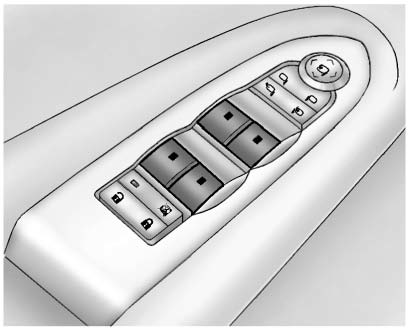
Press the switch to lower the window. Pull the switch up to raise it.

Press the switch to lower the window. Pull the switch up to raise it.

For more information, see Power Windows .

Seat Adjustment

Power Seat

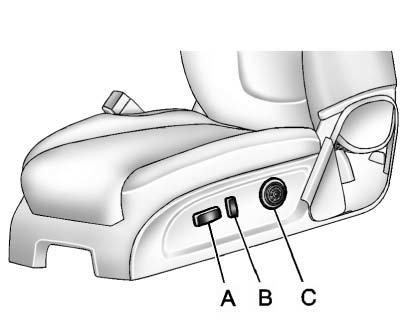
A. Seat Adjustment Control B. Reclining Seatback Control C. Lumbar Adjustment

A. Seat Adjustment Control B. Reclining Seatback Control C. Lumbar Adjustment Control . Move the seat forward or rearward by moving the control (A) forward or rearward.

► Raise or lower the front or rear part of the seat cushion by moving the front or rear of the control (A) up or down.
► Raise or lower the entire seat by moving the control (A) up or down.

See Power Seat Adjustment .

To raise or recline the seatback, tilt the top of the control (B) forward or rearward. See Reclining Seatbacks .

Press the front or rear of the control (C) to increase or decrease lumbar support. See Lumbar Adjustment .

Memory Features

On vehicles with the memory feature, the controls on the driver door are used

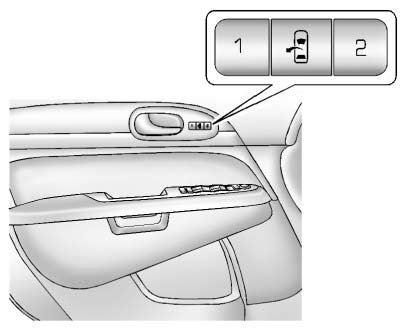
On vehicles with the memory feature, the controls on the driver door are used to program and recall memory settings for the driver seat, outside mirrors, and power steering column, if available.

Storing Memory Positions

To save into memory:

1. Adjust the driver seat and seatback recliner, both outside mirrors, and the power steering column, if available.

See Power Mirrors  and Steering Wheel Adjustment  for more information.

Not all vehicles will have the ability to save and recall the mirror positions.

2. Press and hold “1” until two beeps sound.
3. Repeat for a second driver position using “2.” To recall, press and release "1" or "2." The vehicle must be in P (Park).

► single beep will sound. The seat and outside mirrors will move to the position previously stored for the identified driver.

See Memory Seats  and Vehicle Personalization  for more information.

Easy Exit Posit

The easy exit feature can move the driver seat rearward and the power steering column, if available, up and forward to allow extra room to exit the vehicle.

► : Press to recall the easy exit positions. The vehicle must be in P (Park).

See Memory Seats  and Vehicle Personalization  for more information.

READ NEXT:

 Second Row Seats. Third Row Seats. Heated and Ventilated Seats

Second Row Seats   The second row seat can be folded to access the third row. Pull the sliding seat lever forward; the seat cushion folds, and the seat slides forward. See Rear Seats . Thir

 Head Restraint Adjustment. Safety Belts. Passenger Sensing System

Head Restraint Adjustment Do not drive until the head restraints for all occupants are installed and adjusted properly. To achieve a comfortable seating position, change the seatback recline angle

SEE MORE:

 Exterior Care

Washing the Vehicle To preserve the vehicle's finish, wash it often and out of direct sunlight. Notice: Do not use petroleum based, acidic, or abrasive cleaning agents as they can damage the vehicle's paint, metal, or plastic parts. If damage occurs, it would not be covered by the vehi

 Distracted Driving. Defensive Driving. Drunk Driving

Distracted Driving Distraction comes in many forms and can take your focus from the task of driving. Exercise good judgment and do not let other activities divert your attention away from the road. Many local governments have enacted laws regarding driver distraction. Become familiar with the l

© 2016-2026 Copyright www.benclave.com